WordPress’s block bindings API has taken me a bit to wrap my head around. While there is great documentation covering block binding out there from the Block Editor Handbook and from Full Site Editing, I found myself in need of something more straightforward. I wanted the barest bones explanation of the block bindings API in plain English.
No talk about instances, callbacks, and other dev lingo. Just tell me where to put the stuff in the thing that stuff goes in.
Assuming there are others in the same bind (I couldn’t help myself), others who are also looking for simplified documentation, here’s my attempt at providing that documentation — starting with breaking down what the block bindings API is in the first place.
What is it?
It’s a way to connect (aka bind) a block’s content to a source outside the editor.
Normally we’d drop in a paragraph block and type in it, right? With block bindings, instead of using the content from the editor, we can pull something custom into the block.
Where is it useful?
We can bind blocks to custom fields (post meta) or a custom PHP function.
For custom field example, let’s say we have an event venue or event date and time saved in custom fields. We can pull those in.
For a PHP function example, let’s say we want to create a copyright block in the footer, complete with a copyright symbol and the current year. We can pull that current year into the block dynamically.
How does it work?
Right now, the Block Bindings API is limited to just the paragraph, heading, image, and button blocks.
These blocks connect to our custom source through attributes added directly to the block’s HTML output. The source attribute is what tells WordPress, “This block gets its value from somewhere else.” Then, we’d register that same source name in register_block_bindings_source() so WordPress knows how to fetch the data.
The same way we register a custom post type or custom taxonomy before we can use them, for the block binding to work, the binding needs to be registered too.
Gimme the code!
Let’s say we want to connect a paragraph block to pull in the current date from a function. Here is how we register our connection:
register_block_bindings_source(
	'rachievee-2025/current-date', //how we connect this source in the block's HTML
	array(
		'label' => __( 'Current Date', 'rachievee-2025' ), //don't really know why we need this honestly, but we do
		'get_value_callback' => 'get_current_date_for_source', //function that returns whatever we want
	)
);
The rachievee-2025 can be whatever our theme or plugin’s text domain is. Pay attention to the first line in this function, the rachievee-2025/current-date part. That’s our source name. The get_current_date_for_source is the function name where we’ll be returning the source’s content. Here is that function:
function get_current_date_for_source() : string {
		//a super duper simplified example, this is what we want to pull into the paragraph block
		return __( 'Today\'s date:', 'rachievee-2025' ) . ' ' . date( 'Y-m-d' );
	}
I find it helpful to see code with the proper syntax highlighting so here is a screenshot of the functions in my IDE. It’s the same as the code snippets I’ve already provided, with the exception that they’re written to be in a PHP class.
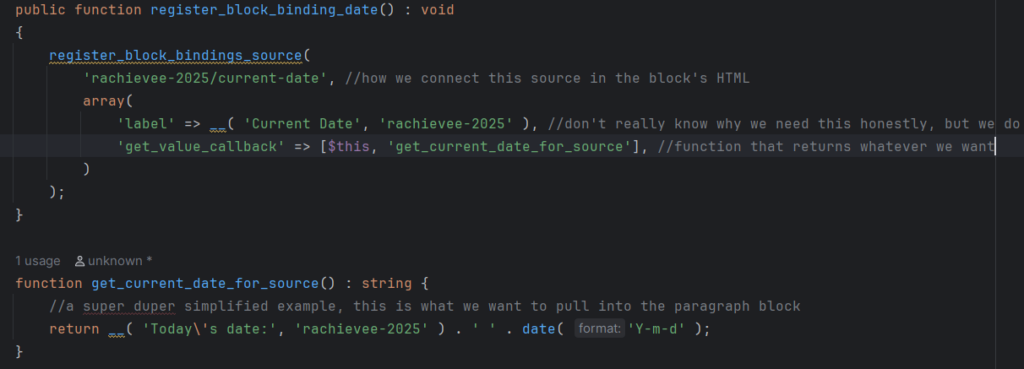
Once you’ve registered where your block’s source content is coming from, now we need to connect the block. On the block’s HTML comment code, let’s add the metadata.bindings attribute like this:
<!-- wp:paragraph {
  "metadata": {
	"bindings": {
	  "content": {
		"source": "rachievee-2025/current-date",
	  }
	}
  }
} -->
<p></p>
<!-- /wp:paragraph -->
Remember: The source value needs to match the name we registered with.
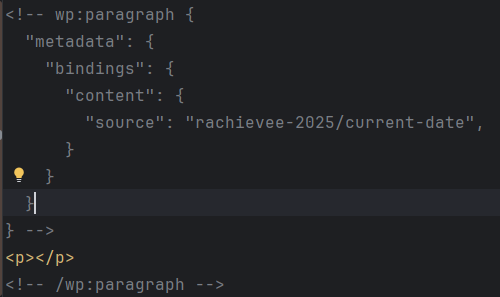
This completes our “binding.” Because we like screenshots, here is what that block’s code looks like:
How to use it in practice?
The code examples that I’ve given are the most stripped down versions of other examples that exist in the wild. It’s encouraging to see something working, and once it “clicks”, then the complexity can follow. Taking those complexities into account, here is how we’d implement block binding in practice:
- We can and should add error handling into the function that returns our custom source.
- Depending on what we’re using the block for, we can include pre-filled content or defaults in case for some reason the custom source isn’t working.
- We can also add and pass custom attributes. For example, if we want the ability to change the date’s format, we can set that up so it passes from the block’s code to the function that gets our source. Then that function would use it to return the date in the format we want.
- For a better user experience and to prevent human error, we should avoid anyone needing to directly go into the editor’s “Code Mode” to edit or connect the block. How do we do this?
- Add the block into an html template. It’s editable, but not from the post editor. It’d have to be edited from the theme editor.
- If it’s a block that’ll function the same no matter where it lives on the site, you can make the block a template part. Like an html template, it’s also editable, but from the theme editor rather than the post editor.
- If it does need to be in the post editor, add the block to a saved pattern. This ensures that the block is already connected, and there’s less chances of needing to make changes. There’s also the option to remove the block completely when it’s part of a larger pattern.
In Summary
In summary, the block bindings API is a way to connect aka bind supported blocks to a source outside of the WordPress block editor.
There are three main parts of a block binding:
- The
meta.bindingattribute on the block that references that same source name. - The function that registers the binding and defines the source name.
- The callback function that the registration uses to return the data.
If this plain English explanation of the block bindings API post was helpful, let me know! I’m still exploring the depths of this feature and how it can be applied in the wild. I’d love to hear from readers how they’re using the block bindings API or if they’re not using it at all, and instead, have an alternative method. Drop your thoughts in the comments!
For further reading, another resource that was helpful to me was Misha’s Block Bindings API post. I find a lot of their posts super helpful, so feel free to browse through their blog. Happy block binding!
(This post and this block theme were created by a human, so expect a few imperfections.)
Leave a Reply