If you’ve been avoiding Gutenberg or haven’t had a need for it yet, but you’re now either curious or have to learn it, approaching Gutenberg as a Classic WordPress developer can be a challenge. WordPress has been around long enough that there are certain standards that might be hammered into you, that now with Gutenberg in the mix, you’ll find yourself having to pivot away from.
If you’re anything like me, going against these practices are going to feel icky. Shifting your mindset might not come as naturally to you, and that’s okay. I’m right there with you.
Gutenberg is not perfect, but depending on your audience or client, it might be the right tool.
And as WordPress developers, we can find order in the chaos.
To do that, let’s first talk about what things we’ll need to shift away from. Then we can review methods to writing the cleanest code possible while working with Gutenberg, not against it.
Can you shift from creating classic themes to block themes?

The answer is yes, but let’s just rip off the band-aid. Here are some practices that you might adhere to in your daily code writing that you’ll now have to make peace with going against when working with Gutenberg.
Separation of Concerns
Classic WordPress is very good at this. PHP and HTML markup are in theme files. Anything that isn’t strictly styling and layout-related should be in a custom WordPress plugin. There is a default stylesheet, but you can create your own to expand and compile from. Same with JavaScript. There is almost never a need to mix these all up.
If you need to tweak a style, it’s common sense to dive into the stylesheets. If you need to adjust some markup, you’ll jump into a theme template or template part.
In Gutenberg, that is no longer the case, which brings me up to the next thing on the list…
Having a source of truth
In Gutenberg, there is no one source of truth for styles anymore. Same with markup, PHP, or even JavaScript, in Gutenberg’s case, React. Within a block theme, and possibly in combination with block plugins that are installed, it can be a challenge finding where to overwrite a style or adjust something. The good news is, we can minimize this.
Avoid inline styles and !important in CSS
We should still try to avoid these when writing our own styles. Gutenberg however, thrives on inline styles and using !important to force styles from the block editor to override anything else. We don’t have much control over this, but we can try to build our theme so in most cases, it’s not necessary for our people aka our end-users to tinker with style-related options.
Obeying WordPress’s Philosophy
If you’re not familiar with WordPress’s philosophy, to summarize, here are a few core pillars that are especially important for developers:
- No one should have to battle WordPress’s standard out of the box functionality.
- Assume your people, the people using the thing, are non-technically minded.
- It’s better to make decisions, not give unnecessary options. Too many options confuses people.
- The core of WordPress is meant to be “clean, lean, and mean.”
- Simplicity. Strive to make WordPress easier to use.
“If the next version of WordPress comes with a feature that the majority of users immediately want to turn off, or think they’ll never use, then we’ve blown it.”
As of the day this was written, the Classic Editor plugin is active on 9+ million sites. I think it’s safe to say that Gutenberg breaks a lot of the philosophies that made WordPress such an amazing content management tool in the first place. It hurts, I know. Like a beam of sunshine piercing into a vampire, and I feel you. As devs, let’s try and dull that pain, not just for us, but for who we’re building for.

Bringing order to the chaos
All right, now we’re getting down to the real meat and potatoes here. Full disclaimer, I’ve only been tinkering with Gutenberg for a few years now after over a decade in Classic, but I hope that also makes me a better resource for others like me jumping in.
I also want to clarify that I’m not going deep into code. This is a very high level overview so as Classic WordPress devs, we can mentally brace ourselves to go full steam ahead on block-theme creation. There will be separate posts with resources and code snippets.
Lastly, I want to warn you. Interacting with the block editor, editing the theme from the WordPress dashboard, and building a block-theme might feel like we’re overengineering things — things that in Classic WordPress, can be done in a quarter of the time. You’re not imagining it.
In exchange for the freedom to design from the editor, developers take on additional overhead.
You might also breeze right through this. Maybe it won’t feel slow or tedious. And that’s okay too. Even if it does, the good news is the more we do it, the faster we’ll get. Anyway, if all that’s cool with you, let’s roll up our sleeves and get into it!
Simplify! Decisions, not options!
First, familiarize yourself with the block editor if you haven’t already. If you don’t know what the heck something is or what it’s for, odds are, neither will your people. I’ve found that the best way to start off a block theme is to trim off all the fat from Gutenberg.
Decisions, not options. Don’t need gradients? Remove them. Don’t want people to choose any random color from the color palette? Restrict the colors to what your theme expects. Don’t want people to have control over layout? Disable a bunch of blocks under the “Design” section. Don’t need all those “Embed” blocks? Disable those too.
Know who you’re building this for. Understand their workflows. What do they need to thrive and what kinds of things annoy them? Tailor the block editing experience to them.
Once you know your people, you won’t hesitate to disable any blocks or widgets that could negatively affect their editing experience.
And worse comes to worse, if your person changes their mind, or you do, the project should be saved in version control. We can always reverse decisions and add options back. After simplifying, you’ll find that the block list and editor options feel a lot more breathable.
The theme.json is your foundation
The theme.json file is going to be our bread and butter. It can’t do everything yet, but it’ll allow us to set our baseline rules. This is also where working with an amazing designer can be super helpful. I’m not going to dive too deeply into everything that the theme.json is capable of. Again, that’ll be a separate post, but for now, here’s a shortened list of what you can define in this file:
- Colors that can be used for fonts, links, headings, backgrounds etc.
- Border radius, width, style, and color options.
- The container widths of your site. You can define a wide and content width.
- Default margin and padding sizes.
- Font families, weights, and styles.
Our goal is to set as much of our base styles as possible with the theme.json so that by default, in the block editor, and on the front-end, content will look as it should without the need to override it.
Custom Styles
Once you’ve done all you can with the theme.json file, you can add any other styles with a combination of your own stylesheets, and block stylesheets if needed. I’m sure you already have your own preferences so do as you always do here. In my case, for my RachieVee2025 block theme, I created a src folder that contains my Sass files. Those Sass files then get compiled to an assets folder.
Block styles and variations before custom blocks
Gutenberg likes to use “is-something” or “has-something” classes to alter how blocks look. You can do the same. Don’t over engineer. Not everything needs a custom block or a plugin that adds custom blocks. Ask yourself, can I achieve this with CSS only? If the answer is yes, then a block style or block variation will serve you better.
The template hierarchy
The template hierarchy still exists! Hurrah! It’s a bit different now because block themes use HTML files instead of PHP, but at the very least, this morsel of familiarity should be a comfort. Use templates and template parts, both terms you should already know from your Classic WordPress experience, to your advantage.
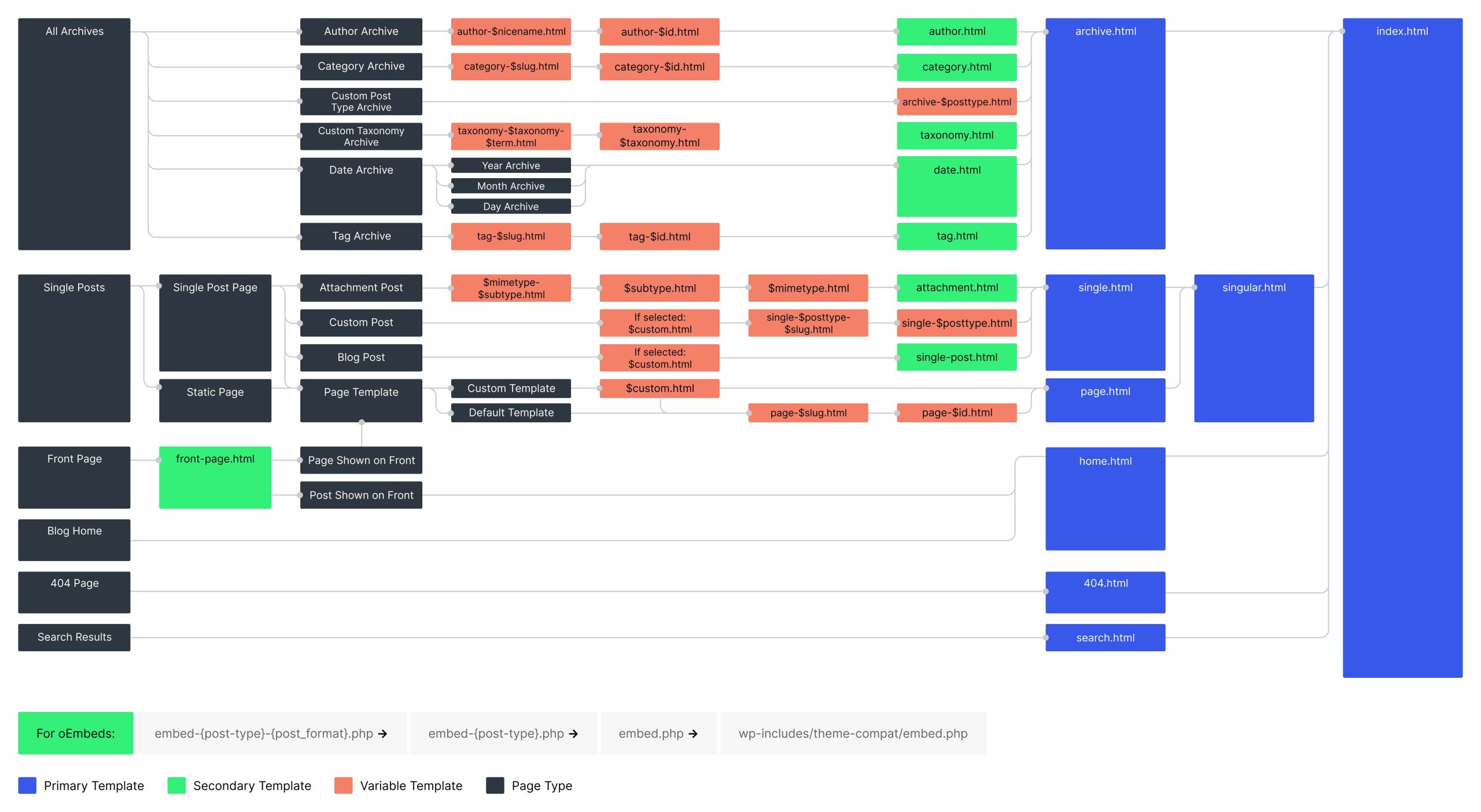
The less your people need to build or style themselves, especially if it’s global or repeatable stuff like headers, footers, what a single post versus what a single page looks like, the better editing experience they’ll have. Block patterns can also make repeatable layouts and content editing smoother.
The new Gutenberg Approach

With this new mindset, you’re ready to dive into Gutenberg. The trick to approaching block themes as a Classic developer isn’t to master or even use every feature. It’s knowing what to turn off, what to define first, and where to draw the line. Here’s what we went over:
- Simplify. Decisions, not options: Remove all the blocks, widgets, and block editor options that are unnecessary.
- Sources of truth for styling and layout: Start with the
theme.json, then move to your own styles and block stylesheets. Finish with block styles and block variations. - Use the template hierarchy. It still exists! Use it for structure, patterns, and repeatable layouts.
Approaching Gutenberg this way is how we tame the chaos. Your CSS stays clean, our editing experience becomes smoother, and our people get something that works for their needs.
I’d love to hear about other people’s tips and experiences so do share! I’m working on follow-up posts with resources and code snippets, so stay tuned.
If I’ve helped you or confused you, let me know in the comments. Either way, thanks for reading!
(This post and this block theme were created by a human, so expect a few imperfections.)
Leave a Reply